解决dify添加代码节点时候错误信息:Run failed: Failed to execute code, which is likely a network issue, please check if the sandbox service is running. ( Error: [Errno -2] Name or service not known )
- AI相关
- 时间:2026-04-14 13:50
- 1228人已阅读
🔔🔔好消息!好消息!🔔🔔
有需要的朋友👉:微信号
问题描述:
这是我的dify中配置chatflow的DSL,疑问:当我不配置代码节点的时候,预览输入:未佩戴安全帽 就可以正常回复。
但是有了代码执行节点之后,同样预览输入同样问题,就错误:Run failed: Failed to execute code, which is likely a network issue, please check if the sandbox service is running. ( Error: [Errno -2] Name or service not known )
查看错误日志:
docker logs docker-sandbox-1 --tail 50
2026/04/14 05:33:09 setup.go:85: [INFO]nodejs runner environment initialized
2026/04/14 05:33:09 setup.go:33: [INFO]initializing python runner environment...
2026/04/14 05:33:09 server.go:18: [PANIC]failed to init config: open conf/config.yaml: no such file or directory
panic:

goroutine 1 [running]:
github.com/langgenius/dify-sandbox/internal/utils/log.(*Log).Panic(...)
	/home/runner/work/dify-sandbox/dify-sandbox/internal/utils/log/core.go:55
github.com/langgenius/dify-sandbox/internal/utils/log.Panic({0x91f4e0?, 0xc0000d9f40?}, {0xc0000d9f08?, 0x0?, 0x47503a?})
	/home/runner/work/dify-sandbox/dify-sandbox/internal/utils/log/core.go:209 +0x69
github.com/langgenius/dify-sandbox/internal/server.initConfig()
	/home/runner/work/dify-sandbox/dify-sandbox/internal/server/server.go:18 +0x5e
github.com/langgenius/dify-sandbox/internal/server.Run()
	/home/runner/work/dify-sandbox/dify-sandbox/internal/server/server.go:95 +0x13
main.main()
	/home/runner/work/dify-sandbox/dify-sandbox/cmd/server/main.go:6 +0xf
2026/04/14 05:34:09 setup.go:29: [INFO]initializing nodejs runner environment...
2026/04/14 05:34:09 setup.go:85: [INFO]nodejs runner environment initialized
2026/04/14 05:34:09 setup.go:33: [INFO]initializing python runner environment...
2026/04/14 05:34:09 server.go:18: [PANIC]failed to init config: open conf/config.yaml: no such file or directory
panic:

goroutine 1 [running]:
github.com/langgenius/dify-sandbox/internal/utils/log.(*Log).Panic(...)
	/home/runner/work/dify-sandbox/dify-sandbox/internal/utils/log/core.go:55
github.com/langgenius/dify-sandbox/internal/utils/log.Panic({0x91f4e0?, 0xc0000b5f40?}, {0xc0000b5f08?, 0x0?, 0x47503a?})
	/home/runner/work/dify-sandbox/dify-sandbox/internal/utils/log/core.go:209 +0x69
github.com/langgenius/dify-sandbox/internal/server.initConfig()
	/home/runner/work/dify-sandbox/dify-sandbox/internal/server/server.go:18 +0x5e
github.com/langgenius/dify-sandbox/internal/server.Run()
	/home/runner/work/dify-sandbox/dify-sandbox/internal/server/server.go:95 +0x13
main.main()
	/home/runner/work/dify-sandbox/dify-sandbox/cmd/server/main.go:6 +0xf
2026/04/14 05:35:09 setup.go:29: [INFO]initializing nodejs runner environment...
2026/04/14 05:35:09 setup.go:85: [INFO]nodejs runner environment initialized
2026/04/14 05:35:09 setup.go:33: [INFO]initializing python runner environment...
2026/04/14 05:35:09 server.go:18: [PANIC]failed to init config: open conf/config.yaml: no such file or directory
panic:

goroutine 1 [running]:
github.com/langgenius/dify-sandbox/internal/utils/log.(*Log).Panic(...)
	/home/runner/work/dify-sandbox/dify-sandbox/internal/utils/log/core.go:55
github.com/langgenius/dify-sandbox/internal/utils/log.Panic({0x91f4e0?, 0x10?}, {0xc0000b5f08?, 0x0?, 0x47503a?})
	/home/runner/work/dify-sandbox/dify-sandbox/internal/utils/log/core.go:209 +0x69
github.com/langgenius/dify-sandbox/internal/server.initConfig()
	/home/runner/work/dify-sandbox/dify-sandbox/internal/server/server.go:18 +0x5e
github.com/langgenius/dify-sandbox/internal/server.Run()
	/home/runner/work/dify-sandbox/dify-sandbox/internal/server/server.go:95 +0x13
main.main()
	/home/runner/work/dify-sandbox/dify-sandbox/cmd/server/main.go:6 +0xf
从日志可以看到,sandbox 容器启动时崩溃的原因是 找不到配置文件:open conf/config.yaml: no such file or directory。这个文件是 sandbox 服务运行所必需的,但你的容器内缺少它。
解决方案
凯哥采用方案:直接把其他地方的复制过来。
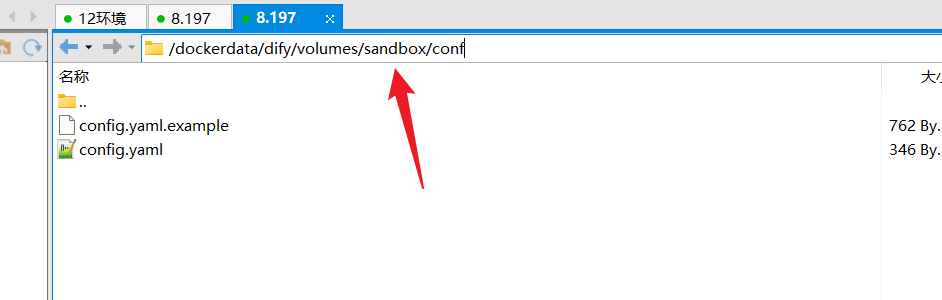
1. 快速修复:重新拉取镜像(最可能有效)
有时镜像下载不完整或损坏会导致内部文件缺失。执行以下命令重新拉取并重建容器:
docker-compose stop sandbox
docker-compose rm -f sandbox
docker rmi langgenius/dify-sandbox:0.2.12
docker-compose pull sandbox
docker-compose up -d sandbox
等待容器启动后,检查状态:
docker ps | grep sandbox
如果状态变为 Up,则问题解决。
2. 如果重新拉取仍失败:手动挂载配置文件
创建配置文件 config.yaml,内容如下(标准配置):
port: 80
python_path: /usr/bin/python3
nodejs_path: /usr/bin/node
allowed_paths:
  - /dependencies
max_execution_time: 120
max_memory: 256
然后修改你的 docker-compose.yaml 中的 sandbox 服务,增加 volumes 挂载该文件:
sandbox:
  image: langgenius/dify-sandbox:0.2.12
  restart: always
  volumes:
    - ./path/to/config.yaml:/app/conf/config.yaml   # 替换为实际路径
    - ./volumes/sandbox/dependencies:/dependencies  # 可选,但推荐
  environment:
    - SANDBOX_PORT=80
保存后重启 sandbox:
docker-compose stop sandbox
docker-compose rm -f sandbox
docker-compose up -d sandbox
3. 临时绕过:改用旧版本镜像(0.2.10)
有用户反馈 0.2.10 版本不依赖外部配置文件。修改 compose 文件中的镜像标签:
image: langgenius/dify-sandbox:0.2.10
然后执行:
docker-compose stop sandbox
docker-compose rm -f sandbox
docker-compose pull sandbox
docker-compose up -d sandbox
4. 检查 sandbox 内部文件结构(诊断用)
如果想确认镜像是否真的缺少文件,可以临时运行一个交互容器:
docker run -it --rm langgenius/dify-sandbox:0.2.12 /bin/sh
ls -la /app/conf/
如果目录不存在或为空,说明确实需要挂载。
验证修复
sandbox 正常启动后,执行:
docker logs docker-sandbox-1 --tail 20
应该看到类似 [INFO] server started on port 80 的日志,没有 PANIC 错误。然后回到 Dify 中再次运行带有代码节点的工作流,应该可以正常执行。
config.yaml内容如下:
app:
  port: 8194
  debug: True
  key: dify-sandbox
max_workers: 4
max_requests: 50
worker_timeout: 5
python_path: /usr/local/bin/python3
enable_network: True # please make sure there is no network risk in your environment
allowed_syscalls: # please leave it empty if you have no idea how seccomp works
proxy:
  socks5: ''
  http: ''
  https: ''
config.yaml.example内容
app:
  port: 8194
  debug: True
  key: dify-sandbox
max_workers: 4
max_requests: 50
worker_timeout: 5
python_path: /usr/local/bin/python3
python_lib_path:
  - /usr/local/lib/python3.10
  - /usr/lib/python3.10
  - /usr/lib/python3
  - /usr/lib/x86_64-linux-gnu
  - /etc/ssl/certs/ca-certificates.crt
  - /etc/nsswitch.conf
  - /etc/hosts
  - /etc/resolv.conf
  - /run/systemd/resolve/stub-resolv.conf
  - /run/resolvconf/resolv.conf
  - /etc/localtime
  - /usr/share/zoneinfo
  - /etc/timezone
  # add more paths if needed
python_pip_mirror_url: https://pypi.tuna.tsinghua.edu.cn/simple
nodejs_path: /usr/local/bin/node
enable_network: True
allowed_syscalls:
  - 1
  - 2
  - 3
  # add all the syscalls which you require
proxy:
  socks5: ''
  http: ''
  https: ''