spring 定时几种实现方式
项目中要经常事项定时功能,在网上学习了下用spring的定时功能,基本有两种方式,在这里进行简单的总结,以供后续参考,此篇只做简单的应用。方案一:注解方式:1.1.在SpringMVC配置文件中添加xmlns:task="http://www.springframework.org/schema/task"http://www.springframework.org/schem
项目中要经常事项定时功能,在网上学习了下用spring的定时功能,基本有两种方式,在这里进行简单的总结,以供后续参考,此篇只做简单的应用。
方案一:注解方式:
1.1.在SpringMVC配置文件中添加
xmlns:task="http://www.springframework.org/schema/task"
http://www.springframework.org/schema/task
http://www.springframework.org/schema/task/spring-task-3.2.xsd
1.2.配置任务扫描
<task:annotation-driven />
1.3.配置扫描任务位置
<!-- 扫描任务 -->
    <context:component-scan base-package="com.kaigejava.task" />
具体配置如下:
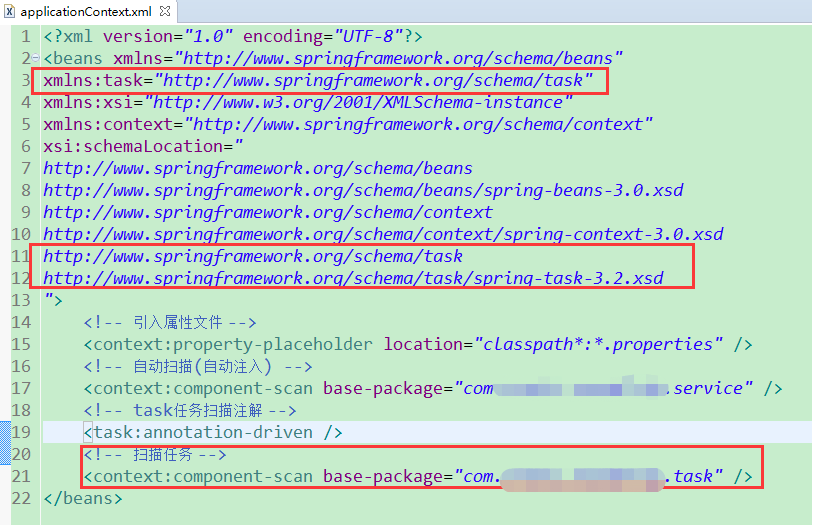 示例代码:
示例代码:
package com.kaigejava.task;

import org.springframework.scheduling.annotation.Scheduled;
import org.springframework.stereotype.Component;

@Component
public class FlightTrainTask {
    @Scheduled(cron = "0/5 * * * * ? ") // 间隔5秒执行
    public void taskCycle() {
        System.out.println("使用SpringMVC框架配置定时任务");
    }
}方案二:不使用注解实现定时任务,将定时的功能在spring配置文件中实现。
xmlns:task="http://www.springframework.org/schema/task"
xsi:schemaLocation=" http://www.springframework.org/schema/task
        http://www.springframework.org/schema/task/spring-task-3.0.xsd”


<description>
        定时任务
    </description>
    //定
原创不易,完成人机校验,阅读全文