spring boot 2.5.x配置属性热更新的轻量级实现方案--【开发阶段配置】
项目开发中,每次修改配置(比如调整接口超时时间、限流阈值)都要重启服务,不仅开发效率低,线上重启还会导致短暂不可用。
虽然Spring Cloud Config、Apollo这类配置中心能解决问题,但对于中小项目来说太重了——要部署服务,成本太高。
今天分析一个轻量级方案,基于SpringBoot原生能力实现配置热更新,不用额外依赖,代码量不到200行。
一、为什么需要“轻量级”热更新?
先说说传统配置方案的痛点
痛点1:改配置必须重启服务
开发环境中,改个日志级别都要重启服务,浪费时间;生产环境更麻烦,重启会导致流量中断,影响用户体验。
痛点2:重量级配置中心成本高
Spring Cloud Config、Apollo功能强大,但需要单独部署服务、维护元数据,小项目用不上这么复杂的功能,纯属“杀鸡用牛刀”。
痛点3:@Value注解不支持动态刷新
即使通过@ConfigurationProperties绑定配置,默认也不会自动刷新,必须结合@RefreshScope,但@RefreshScope会导致Bean重建,可能引发状态丢失。
我们需要什么?
• 无需额外依赖,基于SpringBoot原生API
• 支持properties/yaml文件热更新
• 不重启服务,修改配置后自动生效
• 对业务代码侵入小,改造成本低
二、核心原理:3个关键技术点
轻量级热更新的实现依赖SpringBoot的3个原生能力,不需要引入任何第三方框架
2.1 配置文件监听:WatchService
Java NIO提供的WatchService可以监听文件系统变化,当配置文件(如application.yml)被修改时,能触发回调事件。
2.2 属性刷新:Environment与ConfigurationProperties
Spring的Environment对象存储了所有配置属性,通过反射更新其内部的PropertySources,可以实现配置值的动态替换。
同时,@ConfigurationProperties绑定的Bean需要重新绑定属性,这一步可以通过ConfigurationPropertiesBindingPostProcessor实现。
2.3 事件通知:ApplicationEvent
自定义一个ConfigRefreshEvent事件,当配置更新后发布事件,业务代码可以通过@EventListener接收通知,处理特殊逻辑(如重新初始化连接池)。
三、手把手实现:不到200行代码
结构:
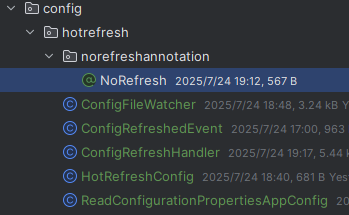
3.1 第一步:监听配置文件变化
创建ConfigFileWatcher类,使用WatchService监听application.yml或application.properties的修改
import lombok.extern.slf4j.Slf4j;


/**
 * @BelongsProject:
 * @BelongsPackage: com.kaigejava.common.config
 * @Author: kaigejava
 * @CreateTime: 2025-07-24  15:41
 * @Description: 监听配置文件变化
 * 创建ConfigFileWatcher类,使用WatchService监听application.yml或application.properties的修改
 * @Version: 1.0
 */

import javax.annotation.PostConstruct;
import javax.annotation.PreDestroy;
import org.springframework.core.io.FileSystemResource;
import org.springframework.core.io.Resource;
import org.springframework.util.ResourceUtils;
import java.io.IOException;
import java.nio.file.*;
import java.util.concurrent.ExecutorService;
import java.util.concurrent.Executors;

@Slf4j
public class ConfigFileWatcher {
    private final String configPath = "classpath:application.yml";
    private WatchService watchService;
    private final ExecutorService executor = Executors.newSingleThreadExecutor();
    private final ConfigRefreshHandler refreshHandler;
    private long lastProcessTime;
    private final long EVENT_DEBOUNCE_TIME = 500;

    public ConfigFileWatcher(ConfigRefreshHandler refreshHandler) {
        this.refreshHandler = refreshHandler;
    }

    @PostConstruct
    public void init() throws IOException {
        Resource resource = new FileSystemResource(ResourceUtils.getFile(configPath));
        Path configDir = resource.getFile().toPath().getParent();
        String fileName = resource.getFilename();

        watchService = FileSystems.getDefault().newWatchService();
        configDir.register(watchService, StandardWatchEventKinds.ENTRY_MODIFY);

        executor.submit(() -> {
            while (true) {
                try {
                    WatchKey key = watchService.take();
                    if (System.currentTimeMillis() - lastProcessTime < EVENT_DEBOUNCE_TIME) {
                        continue;
                    }
                    for (WatchEvent<?> event : key.pollEvents()) {
                        WatchEvent.Kind<?> kind = event.kind();
                        if (kind == StandardWatchEventKinds.OVERFLOW) {
                            continue;
                        }
                        Path changedFile = (Path) event.context();
                        if (changedFile.getFileName().toString().equals(fileName)) {
                            log.info("检测到配置文件修改:{}", fileName);
                            refreshHandler.refresh();
                        }
                    }
                    boolean valid = key.reset();
                    if (!valid) break;
                } catch (InterruptedException e) {
                    Thread.currentThread().interrupt();
                    break;
                }
            }
        });
        log.info("配置文件监听器启动成功,监听路径:{}", configDir);
    }

    @PreDestroy
    public void destroy() {
        e
原创不易,完成人机校验,阅读全文