我们公司使用了 6 年的Spring Boot 项目部署方案!打包 + Shell 脚本部署详解,稳的一批!
本篇和大家分享的是springboot打包并结合shell脚本命令部署,重点在分享一个shell程序启动工具,希望能便利工作;profiles指定不同环境的配置maven-assembly-plugin打发布压缩包分享shenniu_publish.sh程序启动工具linux上使用shenniu_publish.sh启动程序profiles指定不同环境的配置通常一套程序分为了很多个部署环境:开发,
本篇和大家分享的是springboot打包并结合shell脚本命令部署,重点在分享一个shell程序启动工具,希望能便利工作;
- profiles指定不同环境的配置
- maven-assembly-plugin打发布压缩包
- 分享shenniu_publish.sh程序启动工具
- linux上使用shenniu_publish.sh启动程序
profiles指定不同环境的配置
通常一套程序分为了很多个部署环境:开发,测试,uat,线上 等,我们要想对这些环境区分配置文件,可以通过两种方式:
通过application.yml中编码指定 profile.active=uat 方式指定通过mvn中profiles来区分不同环境对应的配置文件夹,人工可以手动在idea勾选生成不同环境的包(推荐)这里我们要讲的是第二种,首先在mvn中配置如下内容:
<profiles>
  <profile>
      <id>node</id>
      <properties>
          <!--传递给脚本的参数值-->
          <activeProfile>node</activeProfile>
          <package-name>${scripts_packageName}</package-name>
          <boot-main>${scripts_bootMain}</boot-main>
      </properties>
      <activation>
          <activeByDefault>true</activeByDefault>
      </activation>
  </profile>
  <profile>
      <id>node1</id>
      <properties>
          <activeProfile>node1</activeProfile>
          <package-name>${scripts_packageName}</package-name>
          <boot-main>${scripts_bootMain}</boot-main>
      </properties>
  </profile>
  <profile>
      <id>node2</id>
      <properties>
          <activeProfile>node2</activeProfile>
          <package-name>${scripts_packageName}</package-name>
          <boot-main>${scripts_bootMain}</boot-main>
      </properties>
  </profile>
</profiles>
节点粗解:
id:用来指定不同环境配置文件所在的目录,如下我这里: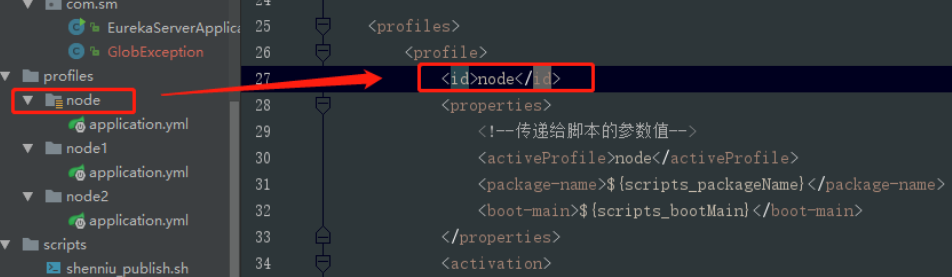
properties:该节点中的节点是可作为参数传递给其他配置文件,如我这里的package-name节点值就可以在另外的assembly.xml或者shell脚本文件中通过${package-name}获取到,如下:

maven-assembly-plugin打发布压缩包
对于springboot程序打包,可以分为jar和war,这里是jar包;有场景是咋们配置文件或者第三方等依赖包不想放到工程jar中,并且把这些文件压缩成一个zip包,方便上传到linux;此时通过maven-assembly-plugin和maven-jar-plugin就可以做到,mvn的配置如:
<plugin>
  <groupId>org.apache.maven.plugins</groupId>
  <artifactId>maven-jar-plugin</artifactId>
  <version>2.6</version>
  <configuration>
      <archive>
          <addMavenDescriptor>false</addMavenDescriptor>
          <manifest>
              <addClasspath>true</addClasspath>
              <classpathPrefix>lib/</classpathPrefix>
              <mainClass>${scripts_bootMain}</mainClass>
          </manifest>
      </archive>
      <!--打包排除项-->
      <excludes>
          <exclude>**/*.yml</exclude>
          <exclude>**/*.properties</exclude>
          <exclude>**/*.xml</exclude>
          <exclude>**/*.sh</exclude>
      </excludes>
  </configuration>
  <executions>
      <execution>
          <id>make-a-jar</id>
          <phase>compile</phase>
          <goals>
              <goal>jar</goal>
          </goals>
      </execution>
  </executions>
</plugin>

<plugin>
  <groupId>org.apache.maven.plugins</groupId>
  <artifactId>maven-assembly-plugin</artifactId>
  <version>2.4</version>
  <!-- The configuration of the plugin -->
  <configuration>
      <!-- Specifies the configuration file of the assembly plugin -->
      <descriptors>
          <descriptor>${project.basedir}/src/main/assembly/assembly.xml</descriptor>
原创不易,完成人机校验,阅读全文
相关推荐
AI相关在dify中,使用了本地的ollama,重启之后ip变化了,怎么修改?学习笔录-SPRING BOOTspring boot 测试插件使用及result风格实例1&打包启动.工作小总结使用shell脚本,每分钟检测一次Tomcat是否启动,如果没有启动就启动学习笔录-SPRING BOOTspring boot 配置文件properties和YAML详解学习笔录-SPRING BOOTspring boot原理分析启动依赖中parent帮我们干了什么工作小总结&小工具类spring boot 2.5.x配置属性热更新的轻量级实现方案--【部署阶段配置】工作小总结使用allatori对Spring boot项目的class文件进行混淆操作 GIT项目spring-boot 项目实践总结