Spring boot+redis 整合websocket实现消息实时推送案例
场景描述:在公司开发的时候,有时候,我们会遇到这种需求:系统消息。当有新消息的时候,需要实时推送消息数量。如下图:这个实时消息怎么推送呢?这里凯哥就使用websocket技术实现这个方案。实战步骤:
场景描述:
在公司开发的时候,有时候,我们会遇到这种需求:系统消息。当有新消息的时候,需要实时推送消息数量。如下图:
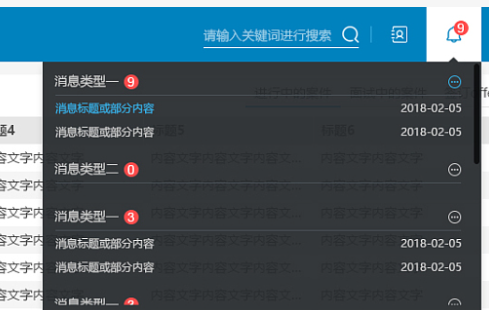
这个实时消息怎么推送呢?这里凯哥就使用websocket技术实现这个方案。
实战步骤:
一:引入依赖
spring boot的版本也是2.7.7
<!-- websocket依赖-->
<dependency>
  <groupId>org.springframework.boot</groupId>
  <artifactId>spring-boot-starter-websocket</artifactId>
  <version>2.7.7</version>
</dependency>
二:开启对websocket的支持
import lombok.extern.slf4j.Slf4j;
import org.springframework.context.annotation.Bean;
import org.springframework.context.annotation.Configuration;
import org.springframework.web.socket.config.annotation.EnableWebSocket;
import org.springframework.web.socket.server.standard.ServerEndpointExporter;

/**
 * @author 凯哥Java
 * @description 开启对websocket的支持
 * @company
 * @since 2023/8/11 22:56
 */
@Slf4j
@Configuration
@EnableWebSocket
public class WebSocketConfig {
    @Bean
    public ServerEndpointExporter serverEndpoint(){
        return new ServerEndpointExporter();
    }

}
三:自定义JSON转换对象
import cn.hutool.json.JSONUtil;

import javax.websocket.EncodeException;
import javax.websocket.Encoder;
import javax.websocket.EndpointConfig;


/**
 * @author 凯哥Java
 * @description 在 websocket 中直接发送 obj 会有问题 - No encoder specified for object of class 需要对 obj 创建解码类,实现 websocket 中的 Encoder.Text<>
 * @since 2023/8/11 22:56
 */
public class WebSocketCustomEncoding implements Encoder.Text<Object> {
    /**
     * The Encoder interface defines how developers can provide a way to convert their
     * custom objects into web socket messages. The Encoder interface contains
     * subinterfaces that allow encoding algorithms to encode custom objects to:
     * text, binary data, character stream and write to an output stream.
     *
     * Encoder 接口定义了如何提供一种方法将定制对象转换为 websocket 消息
     * 可自定义对象编码为文本、二进制数据、字符流、写入输出流
     *  Text、TextStream、Binary、BinaryStream
     * */

    @Override
    public void init(EndpointConfig endpointConfig) {

    }

    @Override
    public void destroy() {

    }

    @Override
    public String encode(Object o) throws EncodeException {
        return JSONUtil.toJsonStr(o);
    }
}
四:编写webSocket服务端
主要使用到的注解:
@ServerEndpoint:注释在类上面
注解是一个类层次的注解,它的功能主要是将目前的类定义成一个websocket服务器端。注解的值将被用于监听用户连接的终端访问URL地址
@OnOpen:注释在方法上面
建立连接成功调用的方法
@OnClose:注释在方法上面
当连接关闭时候调用的方法
onOpen 和 onClose 方法分别被@OnOpen和@OnClose 所注解。他们定义了当一个新用户连接和断开的时候所调用的方法。
@OnMessage:注释在方法上面
方法被@OnMessage所注解。这个注解定义了当服务器接收到客户端发送的消息时所调用的方法。
@OnError:注释在方法上面
发生错误时候调用。
具体代码如下:
import cn.hutool.json.JSONObject;
import com.kaigejava.commoneresult.Result;
import com.kaigejava.config.WebSocketCustomEncoding;
import com.kaigejava.dto.PushParams;
import com.kaigejava.util.RedisUtil;
import lombok.extern.slf4j.Slf4j;
import org.apache.commons.lang3.StringUtils;
import org.apache.logging.log4j.LogManager;
import org.apache.logging.log4j.Logger;
import org.springframework.stereotype.Component;

import javax.annotation.Resource;
import javax.websocket.*;
import javax.websocket.server.PathParam;
import javax.websocket.server.ServerEndpoint;
import java.io.IOException;
import java.util.concurrent.ConcurrentHashMap;

import static com.kaigejava.service.RedisConstant.TOTAL_KEY;

/**
 * @author 凯哥Java
 * @description
 * @company
 * @since 2023/8/11 22:52
 */
@Slf4j
// @ServerEndpoint 注解是一个类层次的注解,它的功能主要是将目前的类定义成一个websocket服务器端。注解的值将被用于监听用户连接的终端访问URL地址
// encoders = WebSocketCustomEncoding.class 是为了使用ws自己的推送Object消息对象(sendObject())时进行解码,通过Encoder 自定义规则(转换为JSON字符串)
@ServerEndpoint(value = "/websocket/{userId}", encoders = WebSocketCustomEncoding.class)
@Component
public class WebSocketServer {
    private final static Logger logger = LogManager.getLogger(WebSocketServer.class);

    @Resource
    private RedisUtil redisUtil;

    /**
     * 静态变量,用来记录当前在线连接数。应该把它设计成线程安全的
     */

    private static int onlineCount = 0;

    /**
     * concurrent包的线程安全Map,用来存放每个客户端对应的MyWebSocket对象
     */
    public static ConcurrentHashMap<String, WebSocketServer> webSocketMap = new ConcurrentHashMap<>();

    /***
     * 功能描述:
     * concurrent包的线程安全Map,用来存放每个客户端对应的MyWebSocket对象的参数体
     */
    public static ConcurrentHashMap<String, PushParams> webSocketParamsMap = new ConcurrentHashMap<>();

    /**
     * 与某个客户端的连接会话,需要通过它来给客户端发送数据
     */

    private Session session;
    private String userId;


    /**
     * 连接建立成功调用的方法
     * onOpen 和 onClose 方法分别被@OnOpen和@OnClose 所注解。他们定义了当一个新用户连接和断开的时候所调用的方法。
     */
    @OnOpen
    public Result onOpen(Session session, @PathParam("userId") String userId) {

        this.session = session;
        this.userId = userId;
        //加入map
        webSocketMap.put(userId, this);
        addOnlineCount();           //在线数加1
        logger.info("用户{}连接成功,当前在线人数为{}", userId, getOnlineCount());
        //先从redis中获取
        String rediske = TOTAL_KEY + userId;
        // Object totalObj = redisUtil.get(rediske);
        int total = 0;
       /* if(Objects.nonNull(totalObj)){
            total = (int)totalObj;
        }*/
        JSONObject object = new JSONObject();
        object.putOnce("total", total);
        try {
            sendMessageObj(object);
        } catch (Exception e) {
            logger.error("IO异常");
        }
        return Result.ok(object);
    }


    /**
     * 连接关闭调用的方法
     */
    @OnClose
    public void onClose() {
        //从map中删除
        webSocketMap.remove(userId);
        subOnlineCount();           //在线数减1
        logger.info("用户{}关闭连接!当前在线人数为{}", userId, getOnlineCount());
    }

    /**
     * 收到客户端消息后调用的方法
     * onMessage 方法被@OnMessage所注解。这个注解定义了当服务器接收到客户端发送的消息时所调用的方法。
     *
     * @param message 客户端发送过来的消息
     */
    @OnMessage
    public void onMessage(String message, Session session) {
        logger.info("来自客户端用户:{} 消息:{}", userId, message);

        //群发消息
        for (String item : webSocketMap.keySet()) {
            try {
                webSocketMap.get(item).sendMessage(message);
            } catch (IOException e) {
                e.printStackTrace();
            }
        }
    }

    /**
     * 发生错误时调用
     *
     * @OnError
     */
    @OnError
    public void onError(Session session, Throwable error) {
        logger.error("用户错误:" + this.userId + ",原因:" + error.getMessage());
        error.printStackTrace();
    }

    /**
     * 向客户端发送消息
     */
    public void sendMessage(String message) throws IOException {
        this.session.getBasicRemote().sendText(message);
        //this.session.getAsyncRemote().sendText(message);
    }

    public void sendMessageObj(Object messageObj) throws IOException, EncodeException {
        this.session.getBasicRemote().sendObject(messageObj);
        //this.session.getAsyncRemote().sendText(message);
    }

    /**
     * 向客户端发送消息
     */
    public void sendMessage(Object message) throws IOException, EncodeException {
        this.session.getBasicRemote().sendObject(message);
        //this.session.getAsyncRemote().sendText(message);
    }

    /**
     * 通过userId向客户端发送消息
     */
    public void sendMessageByUserId(String userId, String message) throws IOException {
        logger.info("服务端发送消息到{},消息:{}", userId, message);

        if (StringUtils.isNotBlank(userId) && webSocketMap.containsKey(userId)) {
            webSocketMap.get(userId).sendMessage(message);
        } else {
            logger.error("用户{}不在线", userId);
        }

    }

    /**
     * 通过userId向客户端发送消息
     */
    public void sendMessageByUserId(String userId, Object message) throws IOException, EncodeException {
        logger.info("服务端发送消息到{},消息:{}", userId, message);
        if (StringUtils.isNotBlank(userId) && webSocketMap.containsKey(userId)) {
            webSocketMap.get(userId).sendMessage(message);
        } else {
            logger.error("用户{}不在线", userId);
        }
    }

    /**
     * 通过userId更新缓存的参数
     */
    public void changeParamsByUserId(String userId, PushParams pushParams) throws IOException, EncodeException {
        logger.info("ws用户{}请求参数更新,参数:{}", userId, pushParams.toString());
        webSocketParamsMap.put(userId, pushParams);
    }

    /**
     * 群发自定义消息
     */
    public static void sendInfo(String message) throws IOException {
        for (String item : webSocketMap.keySet()) {
            try {
                webSocketMap.get(item).sendMessage(message);
            } catch (IOException e) {
                continue;
            }
        }
    }

    public static synchronized int getOnlineCount() {
        return onlineCount;
    }

    public static synchronized void addOnlineCount() {
        WebSocketServer.onlineCount++;
    }

    public static synchronized void subOnlineCount() {
        WebSocketServer.onlineCount--;
    }

    /**
     * 根据用户id给用户推送消息总数
     *
     * @param userId
     */
    public void addTotalAndSendMessageTotalByUserId(String userId)  {
        logger.info("服务端发送消息到{},添加消息数量", userId);

        if (StringUtils.isNotBlank(userId) && webSocketMap.containsKey(userId)) {
            //先从redis中获取
            String rediske = TOTAL_KEY + userId;
            Long total = redisUtil.incr(rediske, 1);
            JSONObject object = new JSONObject();
            object.putOnce("total", total);
            try {
                webSocketMap.get(userId).sendMessageObj(object);
            } catch (IOException e) {
                e.printStackTrace();
            } catch (EncodeException e) {
                e.printStackTrace();
            }
        } else {
            logger.error("用户{}不在线", userId);
        }
    }

    public void sendMessageTotalByUserId(String userId)  {
        logger.info("服务端发送消息到{},获取消息数量", userId);

        if (StringUtils.isNotBlank(userId) && webSocketMap.containsKey(userId)) {
            int total = 0;
            JSONObject object = new JSONObject();
            object.putOnce("total", total);
            try {
                webSocketMap.get(userId).sendMessageObj(object);
            } catch (IOException e) {
                e.printStackTrace();
            } catch (EncodeException e) {
                e.printStackTrace();
            }
        } else {
            logger.error("用户{}不在线", userId);
        }
    }

}
五:自定义消息推送的参数体
package com.kaigejava.dto;

import lombok.Data;

/**
 * @author 凯哥J
原创不易,完成人机校验,阅读全文
相关推荐
工作小总结&小工具类还用WebSocket?这才是实时消息推送的正确姿势!轻量好用~学习笔录-SPRING BOOTspring boot框架学习11-spring boot整合redis学习笔录-SPRING BOOTSpringBoot 整合 Redis 的简单案例其他随笔websocket的介绍服务端向客户端推送消息技术之websocket的介绍学习笔录-SPRING BOOTspring boot 整合shiro 错误学习笔录-SPRING BOOTspring 整合 redis,以及spring的RedisTemplate如何使用学习笔录-SPRING BOOTspring boot 基于yml整合jsp经验分享spring boot整合pagehelper分页插件